Note: When design Power Automate flow, for file path or folder path values, try not to pick from the dropdown list, but instead type in the actual name. When picking from the dropdown list, the designer will undercover save the actual internal physical ID of the location as well. If you then try to export the package and modify it for a different folder, it will be hard as the physical ID will no longer match with the one for the new location. When type in the actual name, the physical ID is not saved in the package.
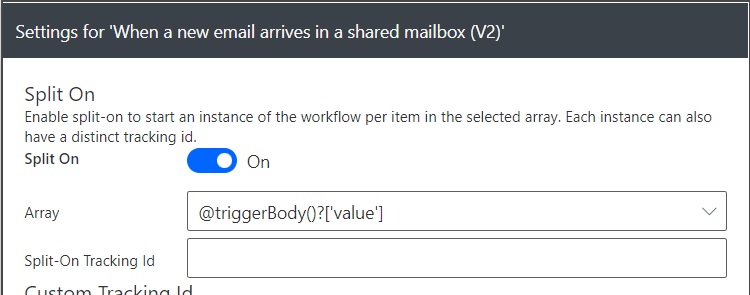
For New Email Arrives action, it might be better to turn “Split On” option on (under Settings for the action), to start a new instance of the workflow for each email received (when multiple emails received at the same time).
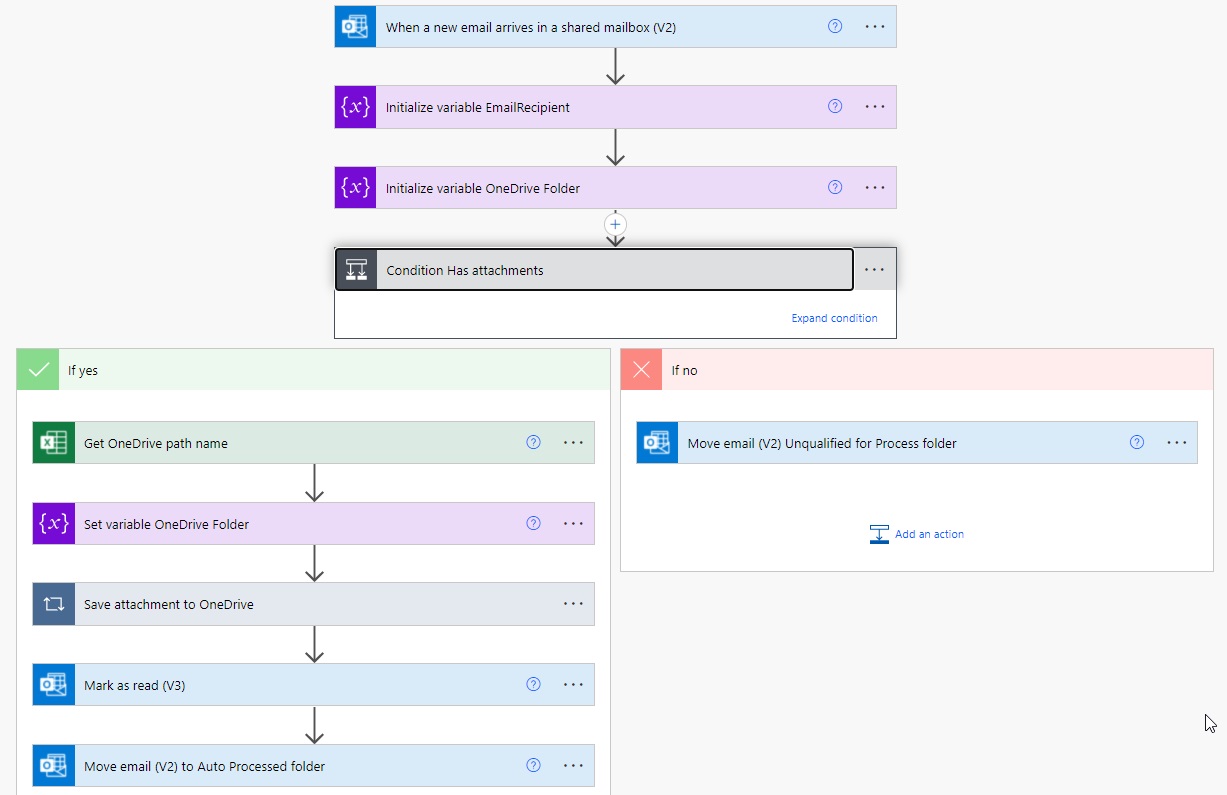
You can have one workflow setup to handle mulitple accounts for the same process. One way would be to set a forward of each account’s email to a centralised shared mailbox and let the workflow triggered by the shared mailbox. An Excel spreadsheet (or a database) holds the mapping of each account with its destination location for the attachements and dynamically adjust the destination according to that mapping.
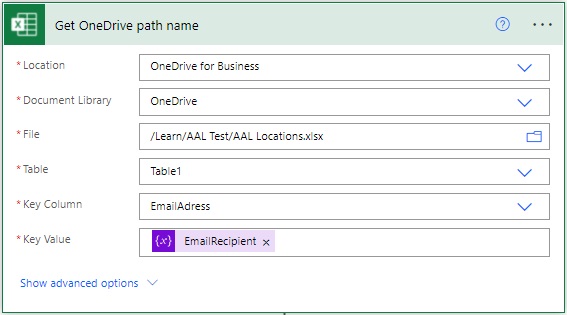 For the Excel Get Row action to work, remember to format the mapping data as table in Excel.

Following Azure App Service function will help to extract alias email account:
#r "Newtonsoft.Json"

using System.Net;
using Microsoft.AspNetCore.Mvc;
using Microsoft.Extensions.Primitives;
using Newtonsoft.Json;
using System.Text.RegularExpressions;

public static async Task<IActionResult> Run(HttpRequest req, ILogger log)
{
    //log.LogInformation("C# HTTP trigger function processed a request.");

    //string name = req.Query["name"];

    string requestBody = await new StreamReader(req.Body).ReadToEndAsync();
    dynamic data = JsonConvert.DeserializeObject(requestBody);

    string strToSearch = System.Text.Encoding.UTF8.GetString(Convert.FromBase64String((string)data?.Text));
    string regularExpression = data?.Pattern;
    RegexOptions options = RegexOptions.IgnoreCase | RegexOptions.IgnorePatternWhitespace | RegexOptions.Multiline;
log.LogInformation(strToSearch.Length.ToString());
    var match = System.Text.RegularExpressions.Regex.Match(strToSearch, regularExpression, options).ToString();

    //match = System.Text.RegularExpressions.Regex.Replace(match, ".*<", "", options);
    //match = System.Text.RegularExpressions.Regex.Replace(match, ">.*", "", options);
    match = System.Text.RegularExpressions.Regex.Replace(match, "To: ", "", options);
    match = System.Text.RegularExpressions.Regex.Replace(match, "\\n", "", options);
    match = System.Text.RegularExpressions.Regex.Replace(match, "\\r", "", options);
    match = System.Text.RegularExpressions.Regex.Replace(match, "\\s+", "", options);
    match = System.Text.RegularExpressions.Regex.Replace(match, "'", "", options);  //some email header may have ' which will cause issue with the Json result
    match = "{'value':'" + match + "'}";

    return new ContentResult()
    {
        ContentType = "application/json",
        Content = match
    };
}
Following Azure App Service Function will convert base64 string to UTF8 string for HttpRequest results:
#r "Newtonsoft.Json"

using System.Net;
using Microsoft.AspNetCore.Mvc;
using Microsoft.Extensions.Primitives;
using Newtonsoft.Json;

public static async Task<IActionResult> Run(HttpRequest req, ILogger log)
{
    string requestBody = await new StreamReader(req.Body).ReadToEndAsync();
    dynamic data = JsonConvert.DeserializeObject(requestBody);

    //string strUTF8 = System.Text.Encoding.UTF8.GetString(Convert.FromBase64String((string)data?.Text));
    byte[] b64 = Convert.FromBase64String((string)data?.Text);
    string strUTF8 = System.Text.Encoding.Unicode.GetString(b64);
    strUTF8 = "{'value':'" + strUTF8 + "'}";

    return new ContentResult()
    {
        ContentType = "application/json",
        Content = strUTF8
    };
}
Following Azure App Service functions does regex search:
#r "Newtonsoft.Json"

using System.Net;
using Microsoft.AspNetCore.Mvc;
using Microsoft.Extensions.Primitives;
using Newtonsoft.Json;
using System.Text.RegularExpressions;

public static async Task<IActionResult> Run(HttpRequest req, ILogger log)
{
    string requestBody = await new StreamReader(req.Body).ReadToEndAsync();
    dynamic data = JsonConvert.DeserializeObject(requestBody);

    string strToSearch = System.Text.Encoding.UTF8.GetString(Convert.FromBase64String((string)data?.Text));
    string regularExpression = data?.Pattern;
    RegexOptions options = RegexOptions.IgnoreCase | RegexOptions.IgnorePatternWhitespace | RegexOptions.Multiline;

    var matches = System.Text.RegularExpressions.Regex.Matches(strToSearch, regularExpression, options);

    var responseString = JsonConvert.SerializeObject(matches, new JsonSerializerSettings()
    {
        ReferenceLoopHandling = ReferenceLoopHandling.Ignore
    });

    return new ContentResult()
    {
        ContentType = "application/json",
        Content = responseString
    };
}