When run query involve transactions using Linked Server, you will need to enable Network DTC Access for MS DTC transaction on both servers. If not configured, you may receive following error message:
“The partner transaction manager has disabled its support for remote/network transactions” (if not enabled on remote server)
“The transaction manager has disabled its support for remote/network transactions” (if not enabled on the local server)
“The operation could not be performed because OLE DB provider “MSOLEDBSQL” for linked server “LinkedServer” was unable to begin a distributed transaction”
Following steps will help to resolve the issue:
-
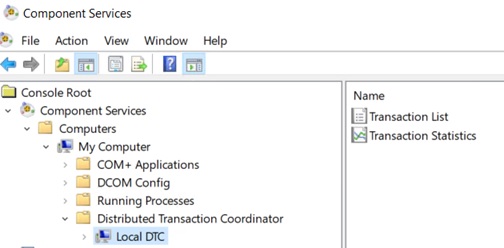
Open the Component Services snap-in. To open Component Services, click Start and in the search box, type dcomcnfg and then press ENTER.
-
Expand the console tree to locate the Local DTC.
-
On the Action menu, click Property
-
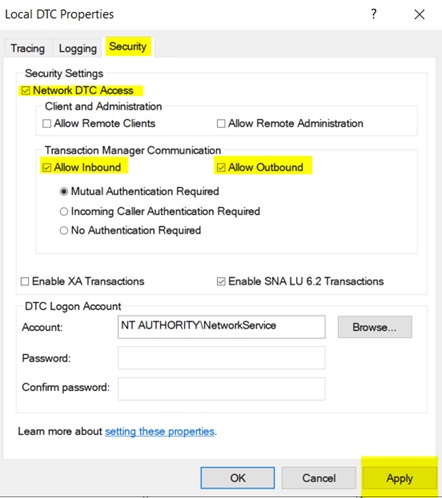
Click the Security tab and make the following changes:
In Security Settings, select the Network DTC Access check box
In Transaction Manager Communication, select the Allow Inbound and Allow Outbound check boxes
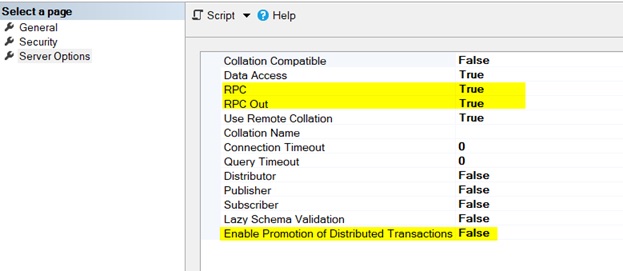
On the linked server property, please also make sure the “Enable Promotion of Distributed Transactions” to be False.
In the event that you need to reinstall MSDTC service, run the following DOS commands
msdtc -uninstall
msdtc -install
After the service is reinstalled, restart SQL Server services