Mermaid lets you create diagrams using text and code. In Visual Studio Code, after install the Mermaid Editor extension, you will be able to create diagram easily. The file name needs to have .mmd file extension.
Following code will generate an example digram:
flowchart TB;
title[<font size=6><B><u>Integration Automation Architecture</u></B>]
title --> A2
style title fill:#FFF,stroke:#FFF
linkStyle 0 stroke:#FFF,stroke-width:0;

    subgraph SG1[Power Automate Flow<br>]
        A1(Outlook email received) --> B(Retrieve automation config from DS5Admin DB)
        A2(Scheduled API call) --> B
        A3(File created in folder) --> B
        B --> B1(Load raw contents into DS5Admin DB based on config)
    end

    subgraph SG2[Data Process via SQL Agent job<br><br>]
        B1 --> B2(Process raw contents against target DB<br> from within Admin DB)
        B2 --> C{Automation type}
        C -- AAL --> D1(AAL SP)
        C -- pXRF --> D2(pXRF SP)
        C -- LAS --> D3(LAS SP)
        C -- JSON --> D4(JSON SP)
        C -- General CSV --> D5(CSV SP)
        C -. ... .-> D6(...)
    end

    subgraph SG3[Power Automate Flow<br><br>]
        D1 --> E(Notification send to relevant parties based on process result and config)
        D2 --> E
        D3 --> E
        D4 --> E
        D5 --> E
        D6 -.-> E
    end

    %%define colours
     classDef green fill:#9f6,stroke:#333,stroke-width:2px
     classDef orange fill:#f96,stroke:#333,stroke-width:4px
     classDef azure fill:#007fff,stroke:#333,stroke-width:4px
     classDef lightazure fill:#00aaff,stroke:#333,stroke-width:4px
     classDef lightblue fill:#add8e6,stroke:#333,stroke-width:4px

     %%apply background colour for selected nodes or subgraph
     class B2,E green
     class A1,A2,A3 orange
     %%class SG2 lightblue
     class SG1,SG3 lightazure
Result diagram:
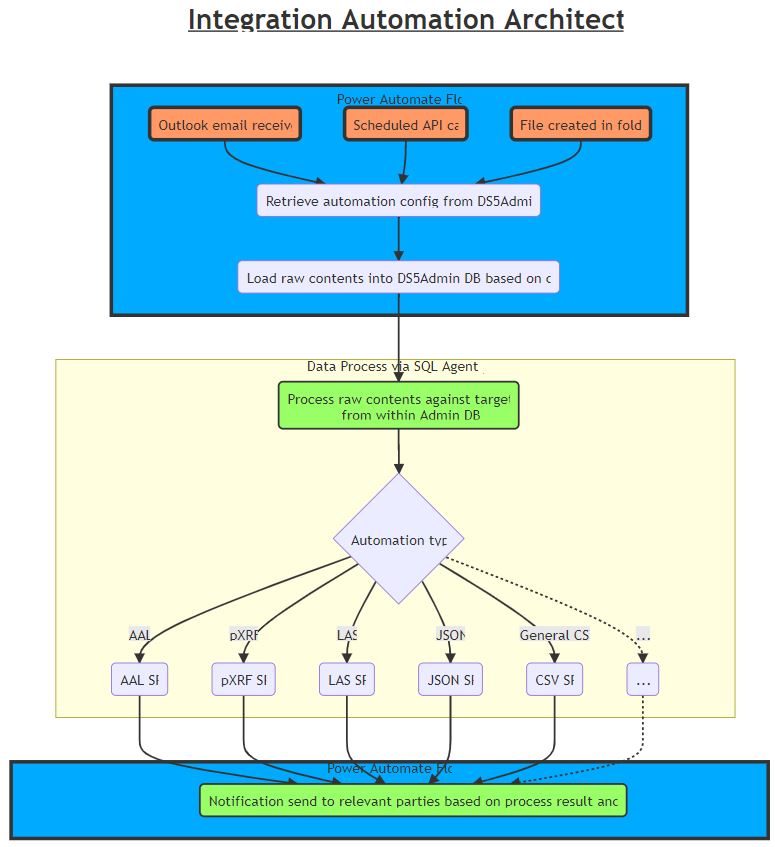
Mermaid doesn’t have inbuilt function to save/print the diagram generated. To be able to print the diagram to svg/png/pdf file, we need to install Mermaid CLI.
To be able to install the Mermaid CLI, we need to have Node.js installed, which installs NPM required. There might be other ways to install NPM.
To generate the file, open cmd terminal and run this:
MMDC -i "C:\temp\digram file.mmd" -o test.png
References:
Mermaid offical docMermaid cheatsheet
Mermaid CLI
Solving NPM not recognized error
FEATURED TAGS
ai
api
automation
availability
availability-sets
availability-zones
aws-vm
azure
azure-automation-runbook
azure-blob
azure-cosmos-db
azure-data-lake
azure-deployment
azure-function-app
azure-functions
azure-openai
azure-sign-in
azure-site-recovery
azure-sql-database
azure-subscription
azure-vm
base64
certificate
change-data-capture
change-tracking
chrome
clr
container
cte
data-api-builder
data-conversion
data-gateway
database-mail
database-role
database-size
date-table
dax
db-config
derived-table
diagram
direct-query
disk-management
disk-space
docker
downtime
dtc
dynamic-m-parameter
embedding
encrypted-connection
excel
excel-online
excel-online-for-business
execution-plan
extended-events
external-data
fabric
fabric-capacity
failover-cluster
fk
geometry
hierarchy
httpwebrequest
hugo
hyper-v
incognito-mode
index
infrastructure
inline-tvf
json
kql
lakehouse
linked-server
live-query-statistics
locking
m
machine-learning
machine-learning-model
machine-learning-services
master-key
mcp
mdx
memory
memory-grant
mermaid
mirrored-sql-server
network
network-card
network-category
office-script
onedrive
onnx-runtime
openrowset
p2v
parquet
performance
polybase
power-automate
power-bi
power-bi-report-tricks
power-platform
power-query
powershell
printer
public-ip-address
pyspark
python
qgis
qt-designer
query-performance
query-plan
query-troubleshooting
r
regex
replication
route
s3
schema-design
scripting
self-signed-certificate
server-role
sharepoint
snowflake
software-development
sofware-development
spark
sql
sql-2025
sql-agent
sql-availability-group
sql-error
sql-failover-cluster-instance
sql-index
sql-openjson
sql-permission
sql-recovery
sql-script
sql-security
sql-server
sql-server-admin
sql-server-config
sql-statistics
ssis
ssisdb
ssl
ssl/tls-error
ssms
table-expression
tempdb
terraform
tips
troubleshooting
unicode
view
visual-studio
visual-studio-code
vmware
wait-statistics
wi-fi-connection-issue
windows-settings