Following SQL Server session settings impact on if an existing plan in cache can be used or not. Only if the session settings are identical to the settings for the cached plan, the plan can then be reused; otherwise, it will be recompiled. Different setting may impact performance at execution.
ANSI_DEFAULTS
ANSI_NULL_DFLT_ON
ANSI_PADDING
ANSI_WARNINGS
ARITHABORT
CONCAT_NULL_YIELDS_NULL
NUMERIC_ROUNDABORT
For stored procedure, the ANSI_NULLS and QUOTED_IDENTIFIER settings will be used are the settings used when the stored procedure is created and runtime settings are irrelevant.
Following session settings will always be ON in future version of SQL Server and explicitly set the option to OFF will result with error. Avoid using/change these settings in application.
ANSI_NULLS
ANSI_PADDING
CONCAT_NULL_YIELDS_NULL
Following session settings must be ON:
ANSI_NULLS  (32)
ANSI_WARNINGS   (8)
QUOTED_IDENTIFIER   (256)
CONCAT_NULL_YIELDS_NULL (4096)
ANSI_PADDING    (16)
ARITHABORT  (64)
Following session settings must be OFF:
NUMERIC_ROUNDABORT (8192)
You can set multiple settings in one go:
SET ANSI_NULLS,ANSI_WARNINGS,ANSI_PADDING,CONCAT_NULL_YIELDS_NULL,QUOTED_IDENTIFIER,ARITHABORT ON
To reduce/prevent cases where runs fast in SSMS but slow in my app, try setting the session settings in your app as what’s in SSMS using the above one line code.
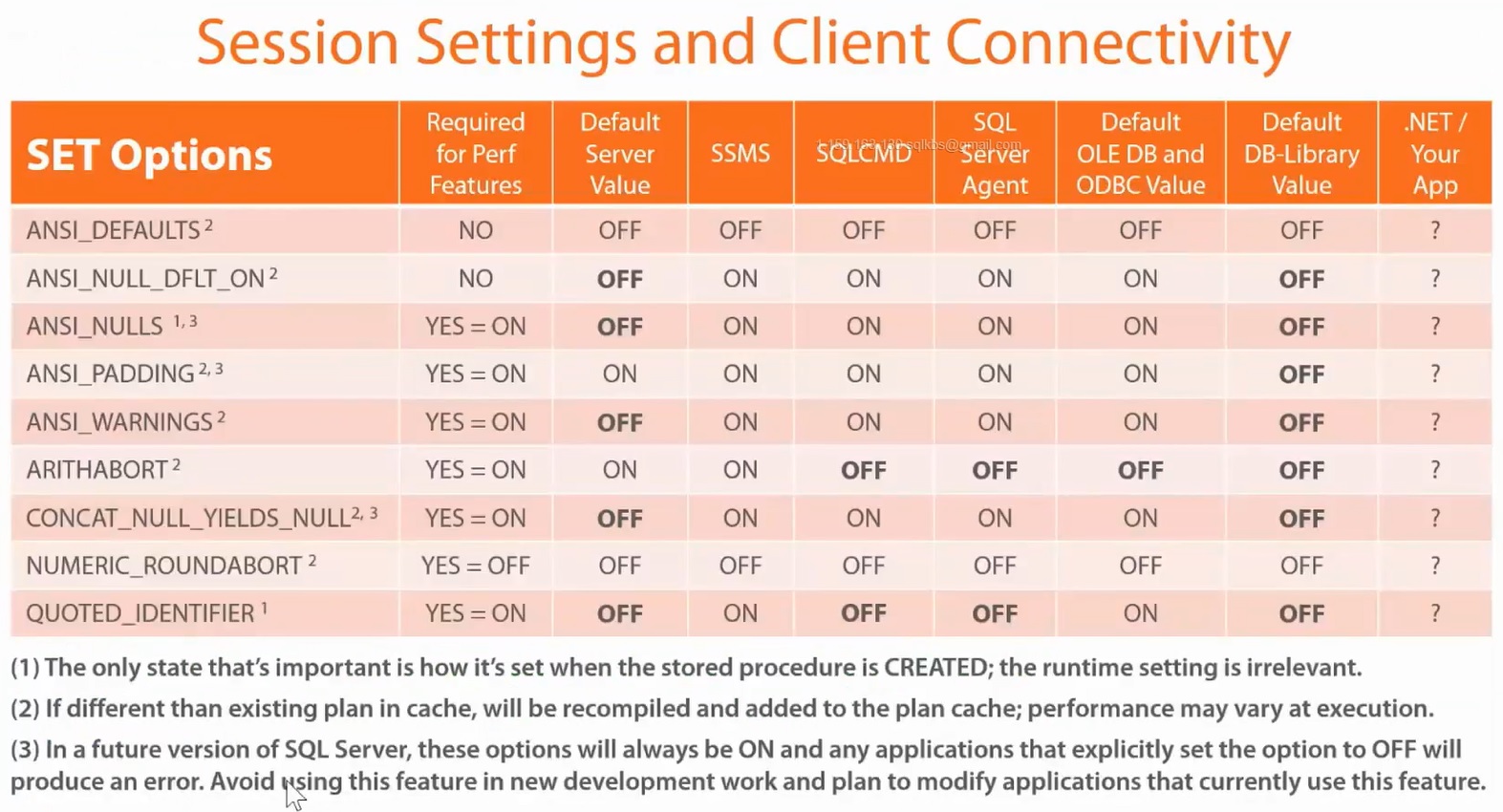 The above settings for SQLCMD are for when running the SQLCMD.exe. The SQLCMD mode in SSMS session will still use the SSMS session settings.
To find the settings for a session, query sys.dm_exec_sessions DMV:
SELECT * FROM sys.dm_exec_sessions
where session_id = @@SPID
--WHERE is_user_process = 1

--For current session, can also utilise @@OPTIONS
SELECT 'ANSI_NULL ' +  CASE WHEN @@OPTIONS & 32 = 32 THEN 'ON' ELSE 'OFF' END